
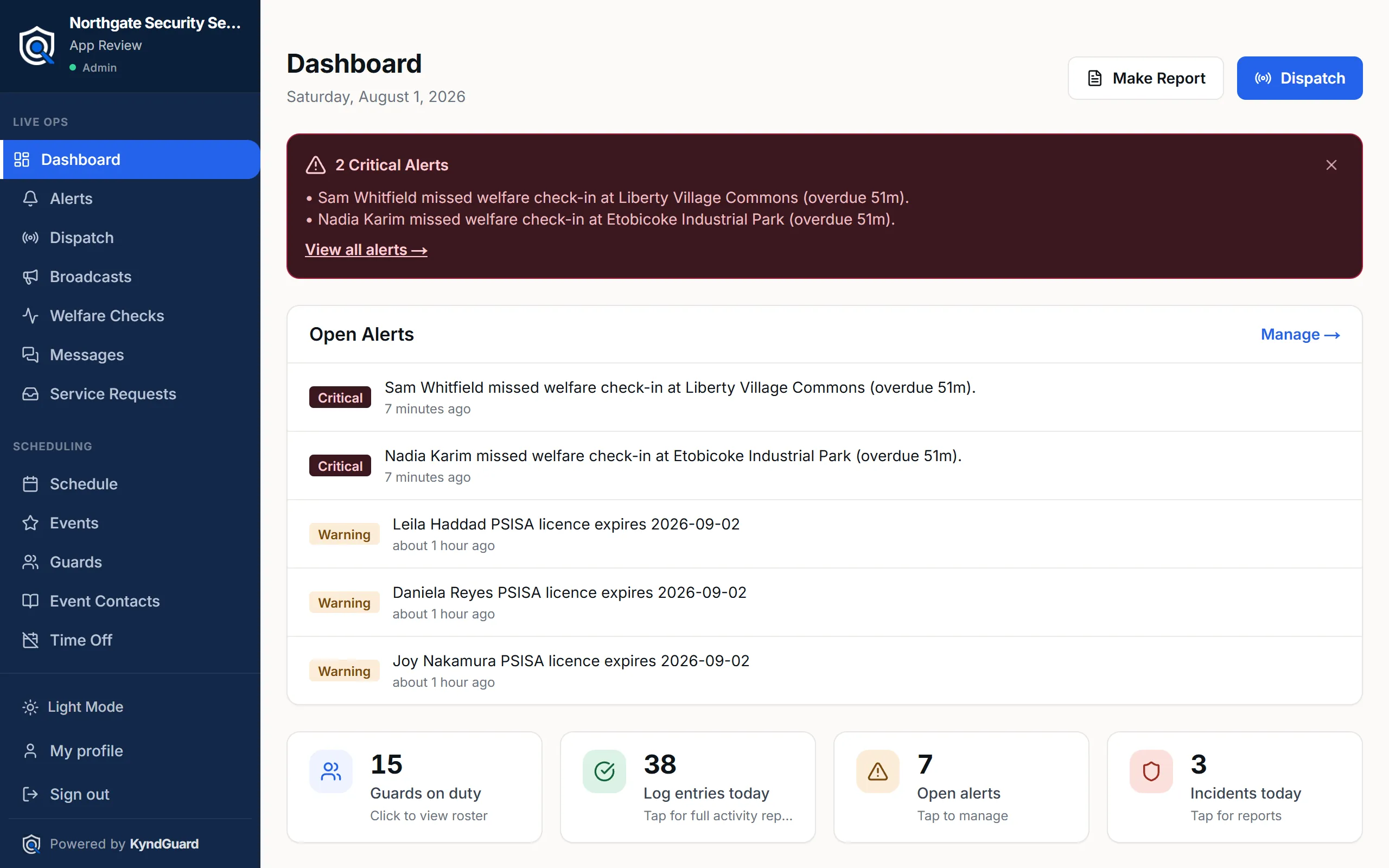
Who is on post, right now.
Clock-in is geofenced to the site, so “on site” is verified by location rather than by a text message saying so. Missed clock-ins, overdue logs and unanswered welfare checks raise themselves.

For security agencies in the United States & Canada
Scheduling, GPS-verified clock-in, daily activity reports, incident filing, client portals and invoicing — one system, built for how guard companies actually run.
No credit card. No install. We set your agency up with you.
01 — The reality
Someone bids two dollars an hour under you. The client cannot see the difference between your officers and theirs, so they go with the number. The problem isn't your guarding — it's that nothing you do survives the shift in a form the client ever sees.
The schedule lives in a file, a group chat, and someone's head. A guard no-shows and you hear about it from the client.
Activity logs arrive as photos of paper, retyped on Monday. "What happened Thursday?" takes an hour to answer.
Invoicing means rebuilding the month by hand — timesheets against sites against rates — and eating the hours you can't prove.
02 — Why it changes the price conversation
A property manager can't see good guarding. They see an empty lobby and an invoice. When the invoice is the only evidence your service exists, the invoice is the only thing left to negotiate.
KyndGuard puts the work in front of them all month — their own login, activity at their sites as it happens, incident reports on your letterhead the same night. Not a summary you assemble on a Sunday.
The pitch stops being we're worth more. It becomes log in and look. That is a much easier sentence to say at a renewal, and a much harder one to argue with.
Show a prospect exactly what their own login will look like on day one. Very few agencies can do that, and it reframes the meeting.
They watch patrols log at their sites. Nobody has to remember to send anything, which is the step that quietly stops happening.
You arrive with the year itself — dated patrols, incidents and response times — instead of a defence of your rate.
03 — The product
Give your client a login of their own and they stop wondering what they are paying for. Patrols, incidents and site notes appear as your officers work — visibility most agencies never offer, and the reason clients stop shopping the rate.

04 — The proof

Twelve months of service in one page your client can take to their own management: patrols completed, threats de-escalated, incidents resolved, coverage hours delivered. Generated from the work your officers already did — nothing to compile.
05 — The rest of the shift
Clock-in is geofenced to the site, so “on site” is verified by location rather than by a text message saying so. Missed clock-ins, overdue logs and unanswered welfare checks raise themselves.
Ask in plain English and get a reply built from your shifts, logs, alerts and post orders — showing which records it used, so you can check it before acting.

Filed from the phone during the shift and delivered as a clean PDF carrying your agency’s name and logo — not a photograph of a clipboard.

Each shift closes with a report your client receives on your letterhead — what was patrolled, what was found, what was done about it. Filed from the phone during the shift, not reconstructed on Monday.

06 — Everything else
Dispatch, broadcasts, SOS, use-of-force records, trespass notices, time off, invoicing, expenses, service requests, uniform tracking — the full list has its own page, with the screens to match.
07 — Coverage
An Ontario agency answers to PSISA. A company operating in Texas, Florida or California answers to a different regulator, with different renewal cycles and different record-keeping expectations.
KyndGuard tracks licence numbers and expiry per guard, and each agency sets the framework it reports under — so compliance reminders match the rules you're actually held to, on either side of the border.
We are not a compliance authority in any of these places. KyndGuard tracks each officer's licence and expiry and lets your agency name the framework it reports under, so the wording on your records matches your regulator.
08 — Boundaries
Every report and invoice carries your agency's name and logo. Your clients never need to know what software you run.
Your client sees the service — patrols, incidents, reports. Your team’s internal records stay internal, so the portal is something you can hand over without a second thought.
Every record is scoped to your agency at the database level — enforced by the database itself, not hidden by the interface.
Every report downloads as a PDF under your name, and you can ask us to delete your agency's data at any time. We are not holding it hostage to keep you.
09 — Pricing
One flat rate per active guard, whatever your headcount — a sixty-guard agency runs the same software as a twelve-guard one, so it pays the same for it. Billed on officers who actually worked, not seats you bought in January. Onboarding, setup and support included.
Everything KyndGuard does, for any size of agency
6per active guard / month
Minimum 10 guards — $60/month
For agencies that want the software shaped to how they work
150/ month, plus the same per-guard rate
Flat retainer + $6 per active guard — no higher rate for a bigger team
One rate per active guard, whatever your headcount — you run the same software either way. Plus applicable taxes. Pay annually and get two months free. First month free, no credit card, no auto-charge when it ends.
10 — Questions
It replaces the spreadsheets, group chats and paper reports most agencies run on. One system handles guard scheduling, GPS-verified clock-in, daily activity reports, incident reporting, client communication and invoicing — so the same hours you scheduled are the hours you bill.
No. KyndGuard runs in the phone's browser and can be added to the home screen, so it behaves like an app without an app-store download or a company-managed device.
A live view of their own sites: patrols as they happen, incident reports on your letterhead, the banned list for their premises, and a Security Impact summary they can take to their own management. It is the thing that turns "we take supervision seriously" into something they can open and read. Your internal records — staffing, welfare, use-of-force — stay on your side.
Yes. Each guard's licence number and expiry is tracked, and each agency sets the regulatory framework it reports under — PSISA in Ontario, or the relevant state board in the US.
Yes. Every record is scoped to your agency at the database level, not just hidden in the interface. One agency cannot read another agency's data.
One rate: $6 USD ($8 CAD) per active guard per month, whatever the size of your team — you are running the same software either way, so you pay the same for it. Minimum ten guards. If you want the platform shaped around your agency — custom AI on your own data, custom modules built into your portal — that is a $150 USD ($200 CAD) monthly retainer on top of the same per-guard rate. Onboarding and support are included either way, and the first month is free.
It's yours. Every report downloads as a PDF carrying your branding, and you can request deletion of your agency's data at any time. If you need a bulk extract of the raw records, ask and we will produce it — we would rather hand it over than have you feel locked in.
Start with one site. Put a week of real shifts through it before you move anything else — we do the setup with you on a screen share, and your old system keeps running until you're satisfied.
No, but do the arithmetic. Twelve guards is $72 a month. One contract with three officers on round-the-clock coverage bills well past $200,000 a year. If the portal and the reporting help you hold that contract at your rate through one more renewal, the software paid for itself many times over. If it doesn't, the first month cost you nothing to find out. Billing starts at ten guards, so a twelve-guard agency pays for twelve.